Wellcome to the mbtrack2 demo !
The idea behind mbtrack2 is to build a coherent object-oriented framework to work on collective effects in synchrotrons. mbtrack2 is composed of different modules allowing to easily write scripts for single bunch or multi-bunch tracking using MPI parallelization in a transparent way.
The base of the tracking model of mbtrack2 is inspired by mbtrack, a C multi-bunch tracking code initially developed at SOLEIL. In addition, many tools to prepare or analyse tracking simulations are included.
The aim of this notebook is to demonstrate the main features of mbtrack2 related to tracking.
Conventions
Tracking
In mbtrack2, a particle is described as a point \((x,x',y,y',\tau,\delta)\) in the 6-dimensional phase-space:
\(x\) and \(y\) are the horizontal and vertical position.
\(x'=\frac{dx}{ds}\) and \(y'=\frac{dy}{ds}\) are the horizontal and vertical transverse momenta.
\(\tau\) is the time difference with respect to the reference particle.
\(\delta = \frac{E - E_0}{E_0}\) is the relative energy deviation from the reference energy \(E_0\).
A particle is late compared to the reference particle if \(\tau > 0\).
Units
mbtrack2 uses SI units.
RF
mbtrack2 uses the cosine convention for RF voltage.
Array structure
The arrays are strcutured as [horizontal_value, vertical_value, longitudinal_value].
Installation
pip install mbtrack2
Synchrotron object
import numpy as np
from mbtrack2 import Synchrotron, Electron
from mbtrack2 import Optics
To known how to use and define mbtrack2 classes, use the help:
help(Synchrotron)
Let us define some paramter for our synchrotron:
h = 20 # Harmonic number of the accelerator.
L = 100 # Ring circumference in [m].
E0 = 1.5e9 # Nominal (total) energy of the ring in [eV].
particle = Electron() # Particle considered.
ac = 1e-3 # Momentum compaction factor.
U0 = 200e3 # Energy loss per turn in [eV].
tau = np.array([1e-3, 1e-3, 2e-3]) # Horizontal, vertical and longitudinal damping times in [s].
tune = np.array([12.2, 15.3]) # Horizontal and vertical tunes.
emit = np.array([10e-9, 10e-12]) # Horizontal and vertical equilibrium emittance in [m.rad].
sigma_0 = 15e-12 # Natural bunch length in [s].
sigma_delta = 1e-3 # Equilibrium energy spread.
chro = [2.0, 3.0] # Horizontal and vertical (non-normalized) chromaticities.
The Optics class stores optic functions related values.
Here we define the values of the optic functions at the tracking location:
local_beta = np.array([3, 2]) # Beta function at the tracking location.
local_alpha = np.array([0, 0]) # Alpha function at the tracking location.
local_dispersion = np.array([0, 0, 0, 0]) # Dispersion function and its derivative at the tracking location.
optics = Optics(local_beta=local_beta, local_alpha=local_alpha,
                  local_dispersion=local_dispersion)
The Synchrotron class stores most global lattice parameters:
ring = Synchrotron(h=h, optics=optics, particle=particle, L=L, E0=E0, ac=ac,
                   U0=U0, tau=tau, emit=emit, tune=tune,
                   sigma_delta=sigma_delta, sigma_0=sigma_0, chro=chro)
Now the Synchrotron object can be used:
ring.T0 # Revolution time in [s].
3.3356409519815204e-07
ring.f1 # Fundamental RF frequency in [Hz].
59958491.6
ring.gamma # Relativistic Lorentz gamma.
2935.4267713650083
Most class attributes in mbtrack are dynamically linked when possible:
ring.T0 = 1e-6 # Revolution time in [s].
ring.L # Ring circumference in [m].
299.792458
An Accelerator Toolbox (AT) format lattice can also be loaded using:
optics = Optics(lattice_file=lattice_file)
ring = Synchrotron(h, optics, particle)
In that case, the AT lattice paramters are used to fill the Synchrotron object.
Main conventions used:
mbtrack2 uses SI units.
the arrays are strcutured as
[horizontal_value, vertical_value, longitudinal_value].
Bunch and Beam objects
from mbtrack2.tracking import Bunch, Beam
Bunch
Defines a Bunch object with 5 macro-particles and a current of 1 mA:
mybunch = Bunch(ring, mp_number=5, current=1e-3)
mybunch
Bunch with macro-particles:
      x   xp    y   yp  tau  delta
0  0.0  0.0  0.0  0.0  0.0    0.0
1  0.0  0.0  0.0  0.0  0.0    0.0
2  0.0  0.0  0.0  0.0  0.0    0.0
3  0.0  0.0  0.0  0.0  0.0    0.0
4  0.0  0.0  0.0  0.0  0.0    0.0
The coordinates for a single dimension can be accessed by brackets:
mybunch["x"]
array([0., 0., 0., 0., 0.])
mybunch["x"] += 1e-3 # add 1 mm offset in horizontal dimension
mybunch
Bunch with macro-particles:
        x   xp    y   yp  tau  delta
0  0.001  0.0  0.0  0.0  0.0    0.0
1  0.001  0.0  0.0  0.0  0.0    0.0
2  0.001  0.0  0.0  0.0  0.0    0.0
3  0.001  0.0  0.0  0.0  0.0    0.0
4  0.001  0.0  0.0  0.0  0.0    0.0
Initialize the bunch macro-particles to have gaussian distribution corresponding to the Synchrotron object equilibrium parameters:
mybunch.init_gaussian()
mybunch
Bunch with macro-particles:
               x        xp             y            yp           tau     delta
0 -2.084987e-04  0.000042 -2.354743e-06  1.763368e-08 -1.228476e-11 -0.001525
1  2.069724e-04 -0.000079  7.575333e-06  1.094831e-06 -1.495581e-11 -0.000325
2 -2.338732e-08 -0.000065 -5.749601e-07 -3.047404e-06 -1.116320e-12  0.001667
3 -3.146090e-04 -0.000016 -3.725427e-07 -1.853939e-06 -6.201892e-12  0.000645
4 -2.040247e-04 -0.000089  8.328185e-06 -4.283898e-07 -6.121920e-12  0.001395
Compute statistical quantities for each dimensions:
mybunch.mean # Mean position of alive particles for each coordinates.
array([-1.04036657e-04, -4.15157739e-05,  2.52025446e-06, -8.43453497e-07,
       -8.13614173e-12,  3.71407418e-04])
mybunch.std # Standard deviation of the position of alive particles for each coordinates.
array([1.85901055e-04, 4.87958068e-05, 4.49444332e-06, 1.45252678e-06,
       4.91518624e-12, 1.17317615e-03])
mybunch.emit # Bunch emittance for each plane.
array([9.71661988e-09, 6.84742833e-12, 3.87997760e-15])
Change the bunch current:
mybunch.current # bunch current in [A]
np.float64(0.001)
mybunch.charge = 5e-9 # charge in [C]
mybunch.current
np.float64(0.005)
This boolean array shows which macro-particles are still “alive” and thoses which are lost:
mybunch.alive
array([ True, True, True, True, True])
mybunch.alive[2] = False
mybunch.alive
array([ True, True, False, True, True])
Lost marco-particles are no longer taken in account for the tracking or to compute bunch parameters:
mybunch.current
np.float64(0.004)
mybunch
Bunch with macro-particles:
           x        xp             y            yp           tau     delta
0 -0.000208  0.000042 -2.354743e-06  1.763368e-08 -1.228476e-11 -0.001525
1  0.000207 -0.000079  7.575333e-06  1.094831e-06 -1.495581e-11 -0.000325
2 -0.000315 -0.000016 -3.725427e-07 -1.853939e-06 -6.201892e-12  0.000645
3 -0.000204 -0.000089  8.328185e-06 -4.283898e-07 -6.121920e-12  0.001395
Beam
The Beam class is defined like an array container for Bunch objects:
mybeam = Beam(ring) # define an empty beam
mybeam[0] # no bunch in the 1st RF bucket as the beam is empty
Bunch with macro-particles:
 Empty DataFrame
Columns: [x, xp, y, yp, tau, delta]
Index: []
Define a filling pattern for our beam:
filling_pattern = np.zeros(ring.h) # empty array of size ring.h
filling_pattern[0:10] = 10e-3 # the first 10 bunches will be filled with 10 mA
filling_pattern[10:15] = 5e-3
filling_pattern[15:20] = 20e-3
Initialize our Beam object with a given filling pattern and 1000 macro-particles per bunch:
mybeam.init_beam(filling_pattern, mp_per_bunch=1e3)
It is possible to access the bunch located in the \(n^{th}\) RF bucket using brackets:
mybeam[5]
Bunch with macro-particles:
             x            xp             y            yp           tau  \
0    0.000219  1.151313e-04  4.726276e-06  4.542654e-06 -1.704017e-11
1   -0.000034  5.956404e-05 -3.868097e-06  7.026998e-07 -2.492073e-11
2   -0.000019 -1.167598e-05 -1.260646e-06 -1.270625e-07 -1.737088e-11
3   -0.000034  6.479364e-06  6.082204e-06  7.972203e-07  1.785072e-12
4   -0.000221 -7.077617e-07  8.195404e-07 -4.922631e-07 -4.618585e-12
..        ...           ...           ...           ...           ...
995  0.000165  4.420796e-05 -6.972923e-07  1.334214e-06  7.797228e-12
996  0.000091 -5.670652e-05 -3.925178e-06  4.881941e-07  1.507927e-11
997 -0.000121 -8.446320e-05 -3.706279e-06 -1.335270e-06  5.077500e-12
998  0.000030 -3.815251e-05 -5.673588e-06  2.307510e-06  1.492277e-11
999 -0.000046 -1.099264e-05  4.665635e-06 -1.597038e-06 -5.786195e-12

        delta
0    0.000907
1    0.000016
2   -0.000248
3    0.000571
4   -0.000369
..        ...
995 -0.001833
996  0.001319
997  0.000219
998 -0.000682
999  0.000411

[1000 rows x 6 columns]
Beam and bunch parameters can be accessed:
mybeam.current # Total beam current in [A]
np.float64(0.22499999999999998)
mybeam.bunch_current # Current in each bunch in [A]
array([0.01 , 0.01 , 0.01 , 0.01 , 0.01 , 0.01 , 0.01 , 0.01 , 0.01 ,
       0.01 , 0.005, 0.005, 0.005, 0.005, 0.005, 0.02 , 0.02 , 0.02 ,
       0.02 , 0.02 ])
fig = mybeam.plot("bunch_current")
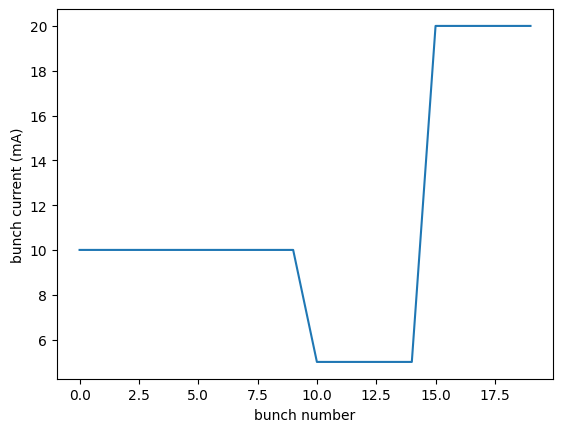
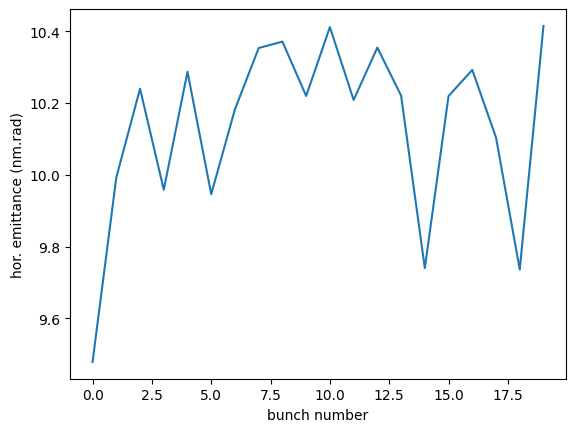
fig = mybeam.plot("bunch_emit","x")
Tracking
In mbtrack2, tracking is done by calling the track method from different objects. This track method applies a transformation to the macro-particles coordinates.
from time import time
from mbtrack2.tracking import LongitudinalMap, RFCavity, SynchrotronRadiation, TransverseMap
For example, the LongitudinalMap element applies the following transform:
\(\tau = \tau + \eta T_0 \delta \)
\(\delta = \delta - \frac{U_0}{E_0}\)
Which corresponds to the transformation of the longitudinal coordinates (\(\tau\), \(\delta\)) undergoes during a full turn in the synchrotron.
LongMap = LongitudinalMap(ring) # define the LongitudinalMap element with the ring parameters
mybunch = Bunch(ring, mp_number=1e3, current=1e-3)
mybunch.init_gaussian()
print(mybunch["tau"][:4])
print(mybunch["delta"][:4])
[-9.06613641e-12 -1.15719854e-11 -4.98481209e-13  7.88230521e-12]
[-0.00040384 -0.00187177  0.00112992  0.00188605]
Tracking the Bunch object through the LongitudinalMap is done by calling its track method with the Bunch object as argument.
LongMap.track(mybunch)
print(mybunch["tau"][:4])
print(mybunch["delta"][:4])
[-9.60324621e-12 -1.35768514e-11  4.97985609e-13  9.63481483e-12]
[-0.00053717 -0.0020051   0.00099658  0.00175271]
In a similar way, the RFCavity element applies:
\(\delta = \delta + \frac{V_c}{E_0} \cos(m \omega_1 \tau + \theta)\)
RF = RFCavity(ring, m=1, Vc=1e6, theta=np.arccos(ring.U0/1e6))
The SynchrotronRadiation element applies:
\(z = \delta, x', y'\)
Where \(z\) is a generic coordinate which can be \(\delta\), \(x'\) or \(y'\).
SR = SynchrotronRadiation(ring)
The TransverseMap element applies:
Where \(z\) is a generic coordinate which can be \(x\) or \(y\).
TransMap = TransverseMap(ring)
Tracking for many turns in then done by writing a python script using a for loop
turns = 100
t1 = time()
for i in range(turns):
  LongMap.track(mybunch)
  SR.track(mybunch)
  TransMap.track(mybunch)
  RF.track(mybunch)
t2 = time()
print(t2-t1)
0.017876863479614258
Tracking methods can be used indiscriminately on Bunch or Beam objects
filling_pattern = np.ones(ring.h)*1e-3 # uniform beam with 1 mA per bunch
mybeam = Beam(ring)
mybeam.init_beam(filling_pattern, mp_per_bunch=1e3)
Tracking with Beam object can be quite long as the code does an internal loop over all the Bunch objects:
turns = 100
t1 = time()
for i in range(turns):
  LongMap.track(mybeam)
  SR.track(mybeam)
  TransMap.track(mybeam)
  RF.track(mybeam)
t2 = time()
print(t2-t1)
0.39601707458496094
Using MPI
MPI can be used to speed up the tracking when using a Beam object by distributing the different Bunch objects in different cores.
MPI parallelisation can be enabled during Beam initialization by setting the mpi option to True:
mybeam = Beam(ring)
mybeam.init_beam(filling_pattern, mp_per_bunch=1e3, mpi=True)
Monitors
The Monitor class and subclasses are used to save tracking data into HDF5 files.
from mbtrack2.tracking.monitors import BunchMonitor, BeamMonitor
All classes which inherit from the Monitor class are linked together and write data to the same HDF5 file which is specify by the file_name keyword in the first declaration of a Monitor.
bunchmonitor = BunchMonitor(bunch_number=0, total_size=100, save_every=1, buffer_size=10, mpi_mode=False, file_name="tracking")
beammonitor = BeamMonitor(h=ring.h, total_size=100, save_every=1, buffer_size=10, mpi_mode=False)
The different types of Monitor can then be added in the tracking loop and save data when the track method is called.
At the end of the tracking, the file where the data is written must be closed by calling the close method on any of the Monitor.
turns = 100
for i in range(turns):
  LongMap.track(mybeam)
  SR.track(mybeam)
  TransMap.track(mybeam)
  RF.track(mybeam)
  bunchmonitor.track(mybeam)
  beammonitor.track(mybeam)
bunchmonitor.close()
The tracking data can then be read from the file after the tracking.
A possible solution to do that is to use the h5py package:
import h5py as hp
file = hp.File("tracking.hdf5","r")
Each Monitor create a different folder at root of the file, so this file has a structure:
list(file)
['Beam', 'BunchData_0']
Each folder (called group in h5py jargon) contains datasets:
list(file["Beam"])
['cs_invariant', 'current', 'emit', 'mean', 'std', 'time']
These datasets contain the tracking data and can be converted to numpy arrays:
print(np.array(file["Beam"]["emit"]).shape)
print(np.array(file["Beam"]["emit"][0,0,:20])) # print the horizontal emittance of the 1st bunch for the first 20 turns
(3, 20, 100)
[9.25827905e-09 9.25581978e-09 9.24036486e-09 9.26474585e-09
 9.24318684e-09 9.23086640e-09 9.24444264e-09 9.21807124e-09
 9.19586386e-09 9.21709947e-09 9.18412775e-09 9.23783349e-09
 9.22647559e-09 9.26447437e-09 9.27283945e-09 9.29140576e-09
 9.27205301e-09 9.24203348e-09 9.25790383e-09 9.23835757e-09]
The tracking data can also directly be plotted using the functions provided in mbtrack2:
from mbtrack2.tracking.monitors import plot_beamdata, streak_beamdata
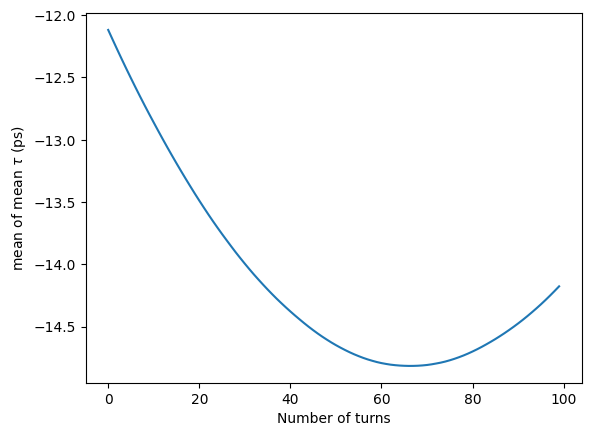
Plot the mean longitudinal position (center of mass) of all bunches:
fig = plot_beamdata(filenames="tracking.hdf5", dataset="mean", dimension="tau", stat_var="mean")
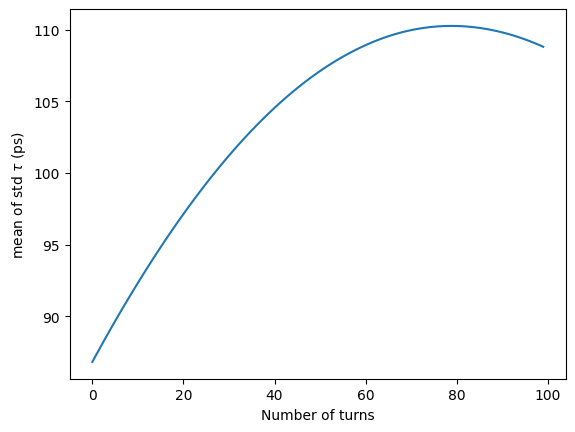
Plot the mean bunch length of all bunches:
fig = plot_beamdata(filenames="tracking.hdf5", dataset="std", dimension="tau", stat_var="mean")
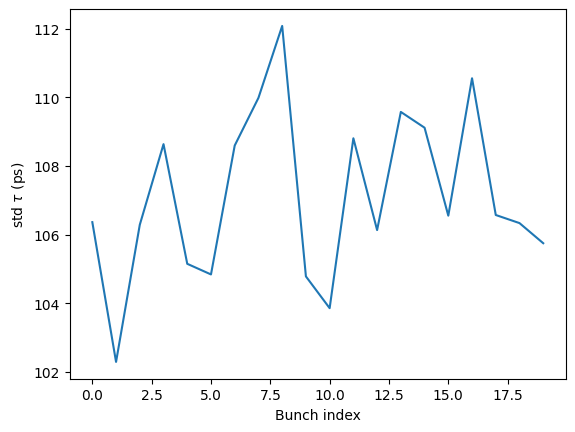
Plot the bunch length versus bunch index:
fig = plot_beamdata(filenames="tracking.hdf5", dataset="std", dimension="tau", x_var="index", turn=50)
Plot the evolution of the longitudinal center of mass versus bunch index:
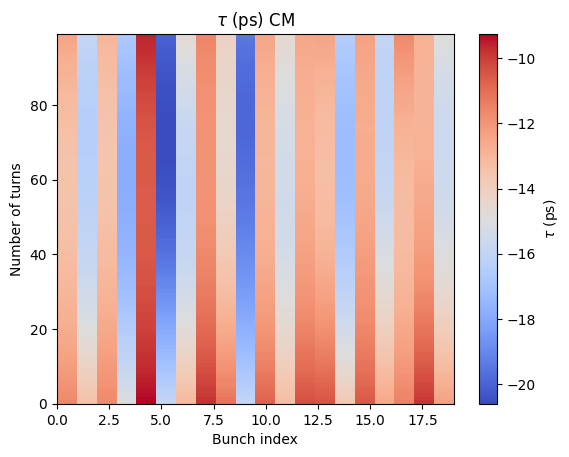
fig = streak_beamdata("tracking.hdf5", dataset="mean", dimension="tau")